
Gemma 4 Guides
Kimi K3 Pricing: API Costs, Subscription Plans, and What's Actually Free
Kimi K3 Pricing: API Costs, Subscription Plans, and What's Actually Free
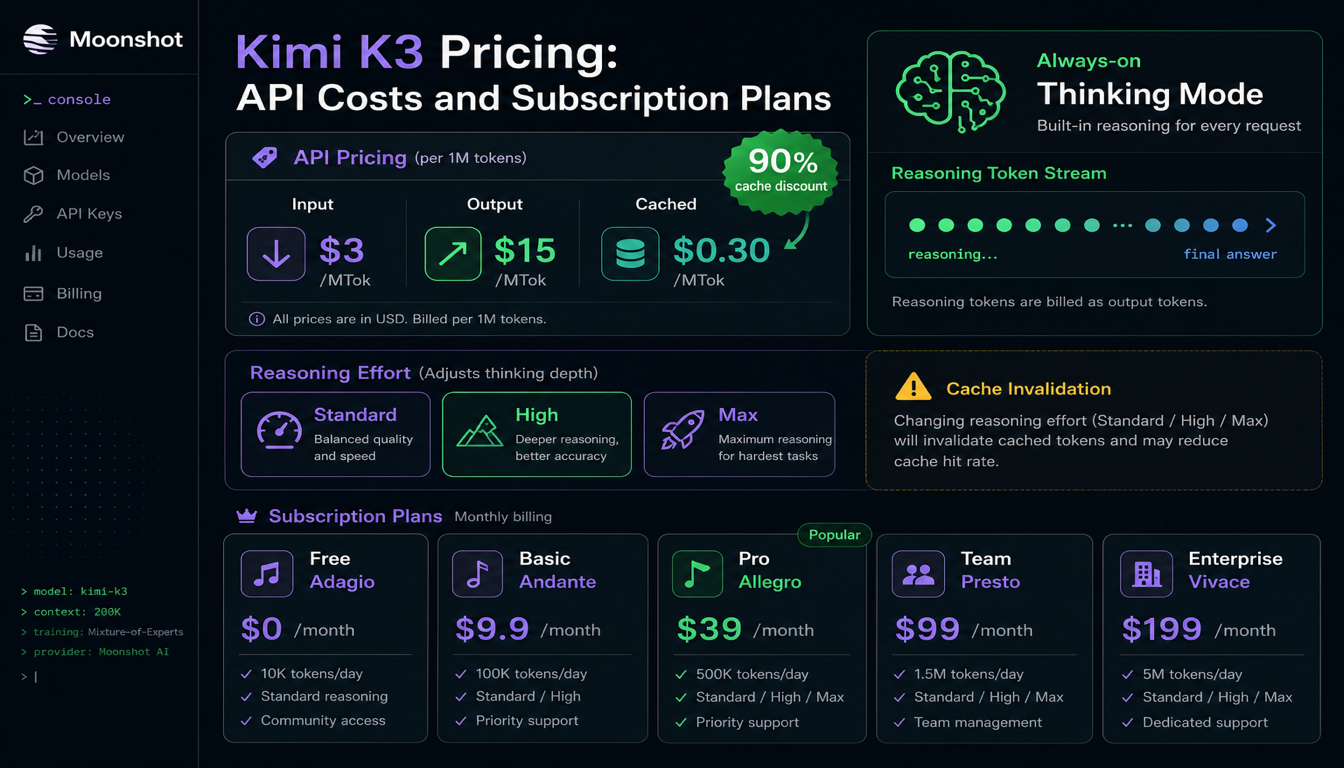
Kimi K3's headline API price — $3 per million input tokens, $15 per million output — reads as competitive against Claude and GPT-tier pricing. It is. But K3 has one property that changes the math more than the token price does: thinking mode is always on and cannot be disabled. Every call pays for reasoning tokens, billed as output, whether you wanted them or not. This guide covers the real pricing structure, how the reasoning-token cost actually shows up on your bill, and the consumer subscription tiers, which are a completely separate product from the API.
Quick answer
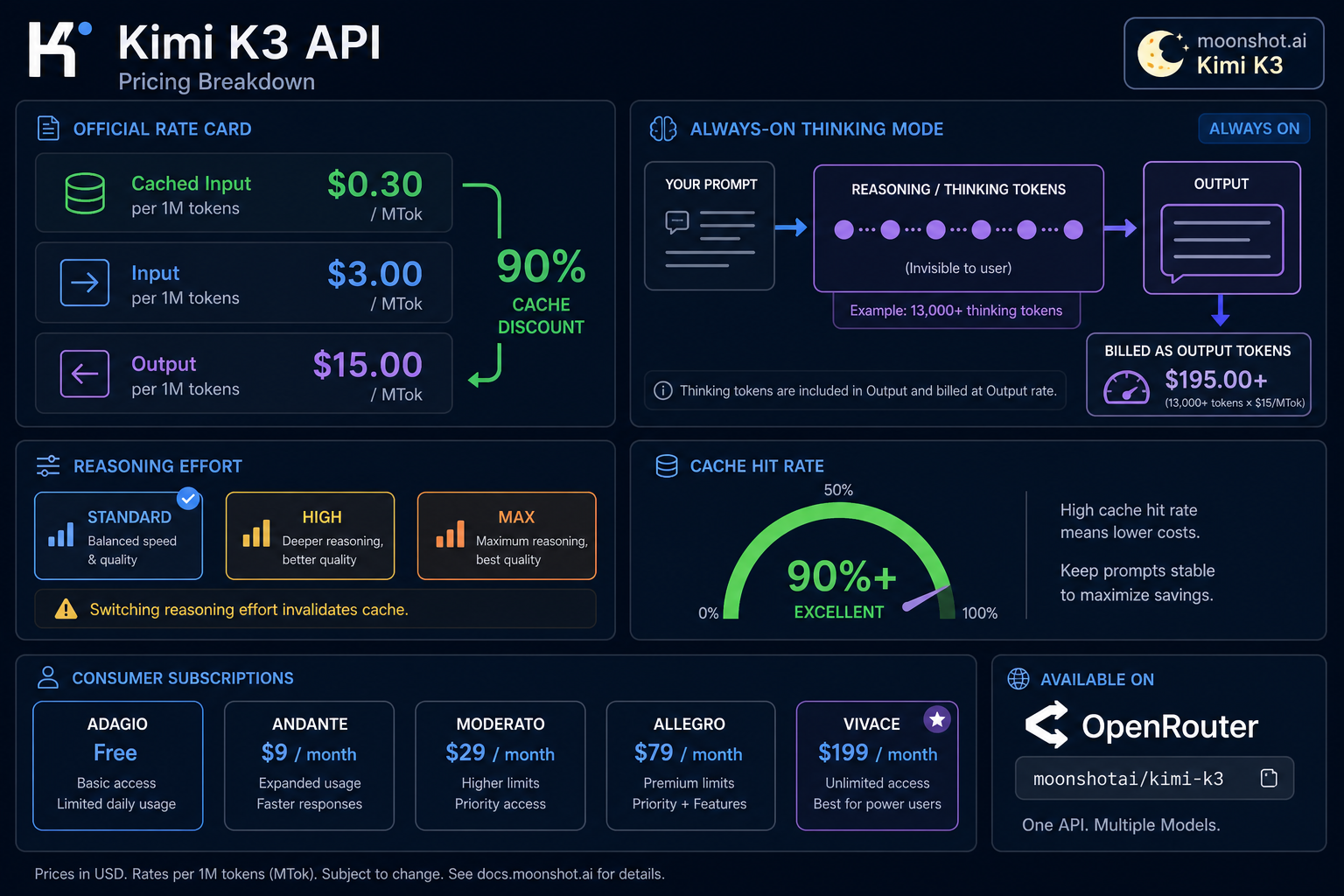
- API pricing: $3 / MTok input, $15 / MTok output, $0.30 / MTok cached input (a 90% discount on cache hits).
- Base URL:
https://api.moonshot.ai/v1, OpenAI-compatible. Model ID:kimi-k3. - Get a key at:
platform.kimi.aiorplatform.moonshot.ai(same underlying console). - Thinking mode cannot be turned off. K3 always reasons before answering, and those reasoning tokens are billed as output tokens — independent testing has recorded over 13,000 thinking tokens for a single short task at max reasoning effort.
- Reasoning effort has three tiers — Standard, High, Max — and switching between them mid-session invalidates your context cache, forcing an expensive re-prefill.
- Caching is automatic. No manual cache ID or TTL configuration; Moonshot reports over 90% cache hit rates on coding workloads.
- Also on OpenRouter as
moonshotai/kimi-k3, same $3/$15 per-million pricing. - Consumer app subscriptions (Adagio/Moderato/Allegretto/Allegro/Vivace, $0–$199/month) are billed separately from the API and do not include API calls.
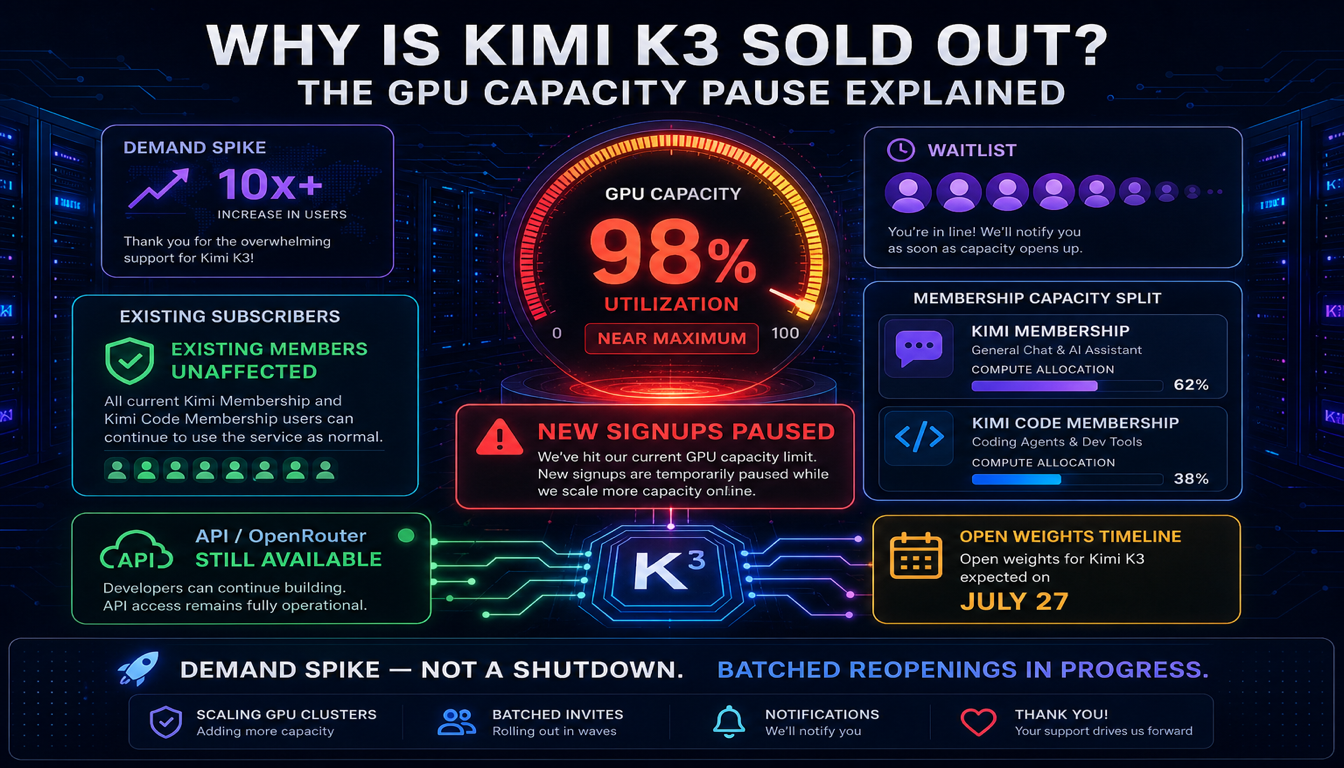
- New subscription signups are currently paused. Moonshot paused new Kimi Membership signups on July 19, 2026 after demand exceeded its GPU capacity — existing subscribers and (as far as reported) the API are unaffected. Details: why Kimi K3 sold out.
How to get a Kimi K3 API key
- Go to
platform.kimi.ai(orplatform.moonshot.ai— both currently route to the same developer console) and sign in or create an account. - Complete any required verification.
- Open the API keys section and create a new key. Copy it immediately — it's shown once.
- Set a budget cap and a low-balance alert before running anything beyond a handful of test calls. With always-on reasoning tokens, costs can climb faster than you'd expect from the headline per-token price alone.
Treat the key as a secret — environment variable or secret manager, never committed to source.
Kimi K3 official pricing
| Cached input | Input | Output | |
|---|---|---|---|
| Kimi K3 | $0.30 / MTok | $3.00 / MTok | $15.00 / MTok |
That's a 10x difference between cached and uncached input, and a 5x difference between input and output. Both multipliers matter more for K3 than for most models, for the reason covered next.
Why "always-on thinking" changes your bill
Most models let you choose whether to spend tokens on visible reasoning. Kimi K3 doesn't — every response includes reasoning_content generated before the final answer, and Moonshot bills those reasoning tokens as output tokens, at the full $15/MTok rate.
In practice, this means:
- A short factual answer can cost far more than it looks like it should. Independent testing has documented over 13,000 thinking tokens consumed for a task whose final answer was a few sentences. At $15/MTok, that's roughly $0.20 in reasoning alone, before the visible answer is generated.
- You cannot opt out. Unlike Kimi K2.6, which let you disable thinking mode entirely for latency- and cost-sensitive calls, K3 has no "instant" mode. If your workload is high-volume and latency- or cost-sensitive — autocomplete, simple classification, short chat replies — K3's per-call floor is higher than it looks from the sticker price.
- What you can control is reasoning effort, not reasoning itself. K3 exposes a
reasoning_effortparameter with three tiers — Standard, High, and Max — that changes how much the model reasons, not whether it reasons at all.
Reasoning effort tiers and the cache trap
The three effort tiers (Standard / High / Max) let you trade cost and latency against answer quality. The catch: switching reasoning effort mid-session invalidates your context cache. If you've built up a large cached context — a long conversation, a big document, an agent's running tool-call history — and then switch from Max to High (or vice versa) partway through, that entire cache is forfeited and the next call re-prefills it at full uncached-input price.
The practical rule: pick a reasoning effort tier per workload and stick with it for the life of that session or agent run. Don't dynamically adjust effort mid-conversation unless you've confirmed the cache-invalidation cost is worth it for that specific case.
How caching actually works on Kimi K3
Unlike some providers, you don't manage caching manually — there's no cache ID to create or TTL to set. Moonshot's platform (built on their Mooncake disaggregated inference architecture) automatically caches repeated prefixes and reports cache hit rates above 90% on coding workloads.
To get that hit rate in practice:
- Put stable content — system prompts, tool definitions, long reference documents — first in the prompt.
- Put the part that changes on every call — the user's latest message, the newest tool result — last.
- Keep your reasoning effort tier constant within a session (see above).
- Avoid reordering or lightly rewording your system prompt between calls; even small changes can break the prefix match and force a cache miss.
OpenAI-compatible request format
Kimi K3's API matches the OpenAI Chat Completions request/response shape, so any OpenAI SDK works by changing the base URL and model name.
curl
curl https://api.moonshot.ai/v1/chat/completions \
  -H "Authorization: Bearer $MOONSHOT_API_KEY" \
  -H "Content-Type: application/json" \
  -d '{
    "model": "kimi-k3",
    "messages": [
      {"role": "user", "content": "Summarize the tradeoffs of hybrid linear attention in two sentences."}
    ]
  }'
Python (OpenAI SDK)
from openai import OpenAI

client = OpenAI(
    api_key="your-moonshot-api-key",
    base_url="https://api.moonshot.ai/v1",
)

response = client.chat.completions.create(
    model="kimi-k3",
    messages=[
        {"role": "user", "content": "Write a Python function to debounce calls."}
    ],
)
print(response.choices[0].message.content)
Setting reasoning effort
response = client.chat.completions.create(
    model="kimi-k3",
    messages=[...],
    extra_body={"reasoning_effort": "standard"},  # "standard" | "high" | "max"
)
Remember: changing this value between calls in the same session invalidates your cache.
Using Kimi K3 on OpenRouter
K3 is also listed on OpenRouter as moonshotai/kimi-k3, at the same $3/$15 per-million pricing as the direct API. This is a reasonable option if you already route multiple model providers through OpenRouter and want to add K3 without a separate Moonshot account — you'll need a funded OpenRouter account and a key from the OpenRouter dashboard.
Is Kimi K3 free?
Three different questions, three different answers:
Using the Kimi consumer app or web chat. Yes, there's a free tier (Adagio) with usage limits. That's not the API — it doesn't spend API credits and it's billed (or not billed) separately.
Using the Kimi K3 API. No ongoing free tier for production use. New accounts may get limited trial access for testing, but sustained usage requires a funded, paid account.
Using Kimi K3 through OpenRouter or similar routers. Separate billing entirely, with their own credit systems. Not "the Kimi API" even though it reaches the same model.
Kimi K3 subscription cost and plans
Separate product from the API, covering the web app, mobile app, Kimi Code CLI, agent credits, Slides, and other tools:
| Tier | Price/month | Covers |
|---|---|---|
| Adagio | Free | Web/mobile chat, limited usage |
| Moderato | $19 | Higher usage caps |
| Allegretto | $39 | Higher usage caps, more agent credits |
| Allegro | $99 | Heavy usage, expanded tools |
| Vivace | $199 | Highest tier, maximum agent credits |
None of these tiers include API access — if you're building a product or integration, you need a separate, paid API account regardless of which subscription tier you're on personally.
New subscription signups are paused as of July 19, 2026. Moonshot temporarily stopped accepting new Kimi Membership subscribers after demand pushed close to the limits of its GPU capacity within 48 hours of K3's launch. Existing subscribers keep full access, and Moonshot is reopening new signups in batches. Moonshot is also splitting the product into two separate subscriptions going forward — Kimi Membership (web/app/office use) and Kimi Code Membership (programming-focused) — to allocate compute more precisely. Full breakdown: why Kimi K3 sold out. If you need access today, the API above has not been reported as affected by the pause.
Extra costs to watch for
- Reasoning tokens on every call. Covered above — this is the single biggest surprise-cost factor specific to K3.
- Cache-invalidating effort switches. Changing
reasoning_effortmid-session forfeits your cache and re-prefills at full price. - Agent loops. Each step in a tool-using agent typically re-sends system prompt, tool schemas, and running history. With reasoning tokens added on top of that at every step, long agent runs can accumulate cost quickly — cap max steps and set wall-clock timeouts.
- Tool and search fees, if you use Moonshot's built-in tools — check the current tools pricing page, since these are billed separately from model tokens and the results get added back into your next request's input.
How to control Kimi K3 API cost
- Set a hard budget cap and a low-balance alert in the console before scaling past testing.
- Pick one reasoning effort tier per workload and avoid switching mid-session.
- Structure prompts cache-first: stable content early, volatile content last.
- Always pass
max_tokens, especially in agent loops where reasoning tokens can otherwise run long. - Bound agent loops with a step counter and timeout.
- Log input, output, cached-input, and reasoning-token counts separately so you can see exactly where the bill is coming from — reasoning tokens are easy to miss if you're only logging visible output.
Final recommendation
Kimi K3's per-token price is genuinely competitive, and the caching story is strong once you understand the reasoning-effort tradeoff. But the always-on thinking mode means the effective cost of a "simple" call is higher than the headline price suggests, and it's higher than it was on Kimi K2.6, which let you disable reasoning entirely. Before committing to K3 for a high-volume, latency-sensitive workload, run a real test batch and log reasoning-token consumption specifically — don't assume the sticker price is the whole story.
For how K3's pricing compares directly against Claude, see Kimi K3 vs Claude. For the full model overview, start at Kimi K3 explained.
FAQ
How much does Kimi K3 cost? $3 per million input tokens, $15 per million output tokens, and $0.30 per million for cached input hits — roughly a 90% discount on cache hits.
Can I disable thinking mode on Kimi K3 to save money? No. Unlike Kimi K2.6, Kimi K3 always runs in thinking mode. You can only adjust the reasoning effort tier (Standard, High, Max), not turn reasoning off entirely.
Why is my Kimi K3 bill higher than expected?
The most common cause is reasoning tokens — K3 generates reasoning_content on every call, billed as output tokens at $15/MTok. A short visible answer can be preceded by thousands of reasoning tokens. Log reasoning-token counts separately to see the real breakdown.
Does switching reasoning effort save money? It can reduce reasoning-token volume per call, but switching effort tiers mid-session invalidates your context cache, forcing a full-price re-prefill. Pick one tier per session rather than adjusting dynamically.
Is Kimi K3 free to use? The consumer chat app has a free tier (Adagio). The API does not have an ongoing free production tier — new accounts may get limited trial access, but sustained usage is paid.
How do I get a Kimi K3 API key?
Sign in at platform.kimi.ai or platform.moonshot.ai, open the API keys section, and create a new key. Set a budget cap immediately, given the always-on reasoning-token cost.
Is Kimi K3 cheaper than Claude? On a per-token basis, yes — K3's $3/$15 pricing undercuts Claude Opus 4.8's $5/$25. But Opus 4.8 lets you control reasoning effort more granularly, so a direct comparison depends on your actual token mix. See the full pricing comparison.
What is the Kimi K3 subscription cost? The consumer subscription (separate from API billing) runs from free (Adagio) up to $199/month (Vivace), with $19/$39/$99 tiers in between. As of July 19, 2026, new subscription signups are temporarily paused due to a GPU capacity crunch — see why Kimi K3 sold out for the current status and workarounds.
Can I still get a Kimi K3 subscription right now? New signups for the paid consumer tiers are paused as of July 19, 2026, though existing subscribers are unaffected and Moonshot is reopening spots in batches. The pay-per-token API has not been reported as affected, so it's the more reliable path if you need access today.
Related guides
Related guides
Continue through the Gemma 4 cluster with the next guide that matches your current decision.

Kimi K2.6 API Key and Pricing: Updated for K2.7 Code
Current Kimi API pricing for K2.6 and K2.7 Code, what cached input means, how rate limit tiers work, and what to verify before budgeting a coding or agent workflow.
Why Is Kimi K3 Sold Out? The GPU Capacity Pause Explained
Kimi K3 isn't discontinued or actually "sold out" — Moonshot paused new subscription signups after demand maxed out its GPU capacity within 48 hours of launch. Here's what that means if you're trying to get access right now.
Kimi K3 vs Qwen 3.8: What's Confirmed, What Isn't (July 2026)
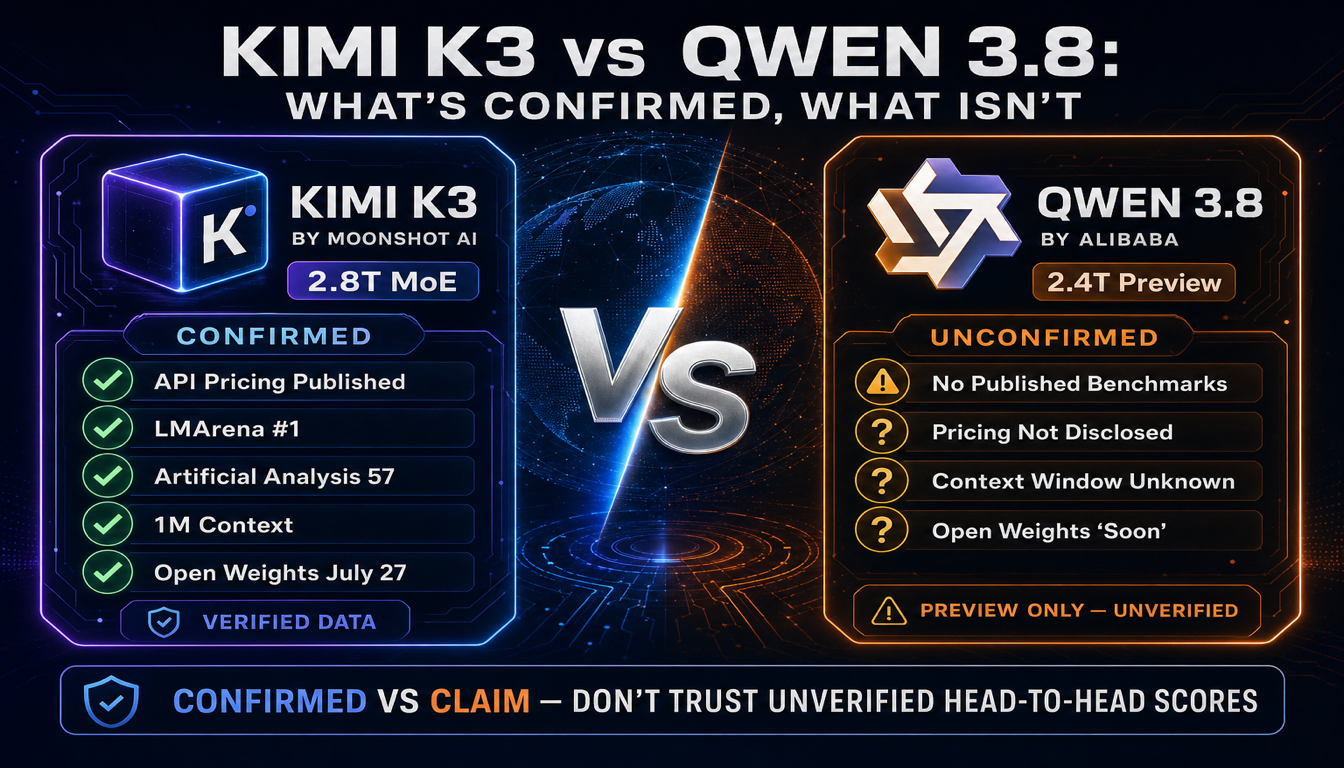
Alibaba previewed Qwen 3.8 three days after Kimi K3 launched, calling it "second only to Fable 5." Problem: Qwen 3.8 doesn't have a single published benchmark yet. Here's what's actually confirmed on both sides before you pick one.
Still deciding what to read next?
Go back to the guide hub to browse model comparisons, setup walkthroughs, and hardware planning pages.