
Gemma 4 指南
Kimi K3 定价:API 费用、订阅方案与真正免费的部分
Kimi K3 定价:API 费用、订阅方案与真正免费的部分
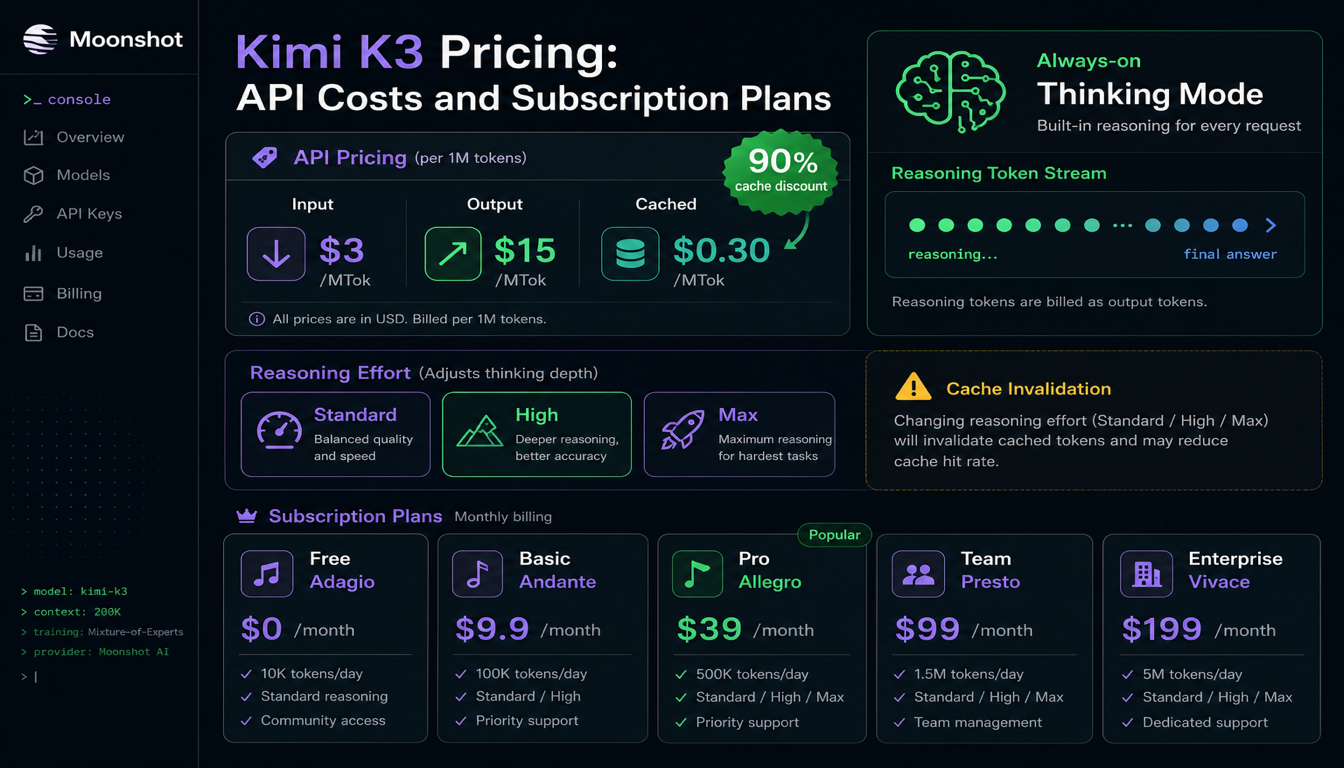
Kimi K3 的 headline API 价格——每百万 input tokens $3、每百万 output $15——相对 Claude 和 GPT-tier 定价很有竞争力。确实如此。但 K3 有一个比 token 价格更能改变计算的属性:thinking mode 始终开启且无法关闭。 每次调用都要为 reasoning tokens 付费,按 output 计费,无论你是否需要。本指南涵盖真实定价结构、reasoning token 成本如何体现在账单上,以及消费者订阅档位——它们与 API 是完全不同的产品。
快速结论
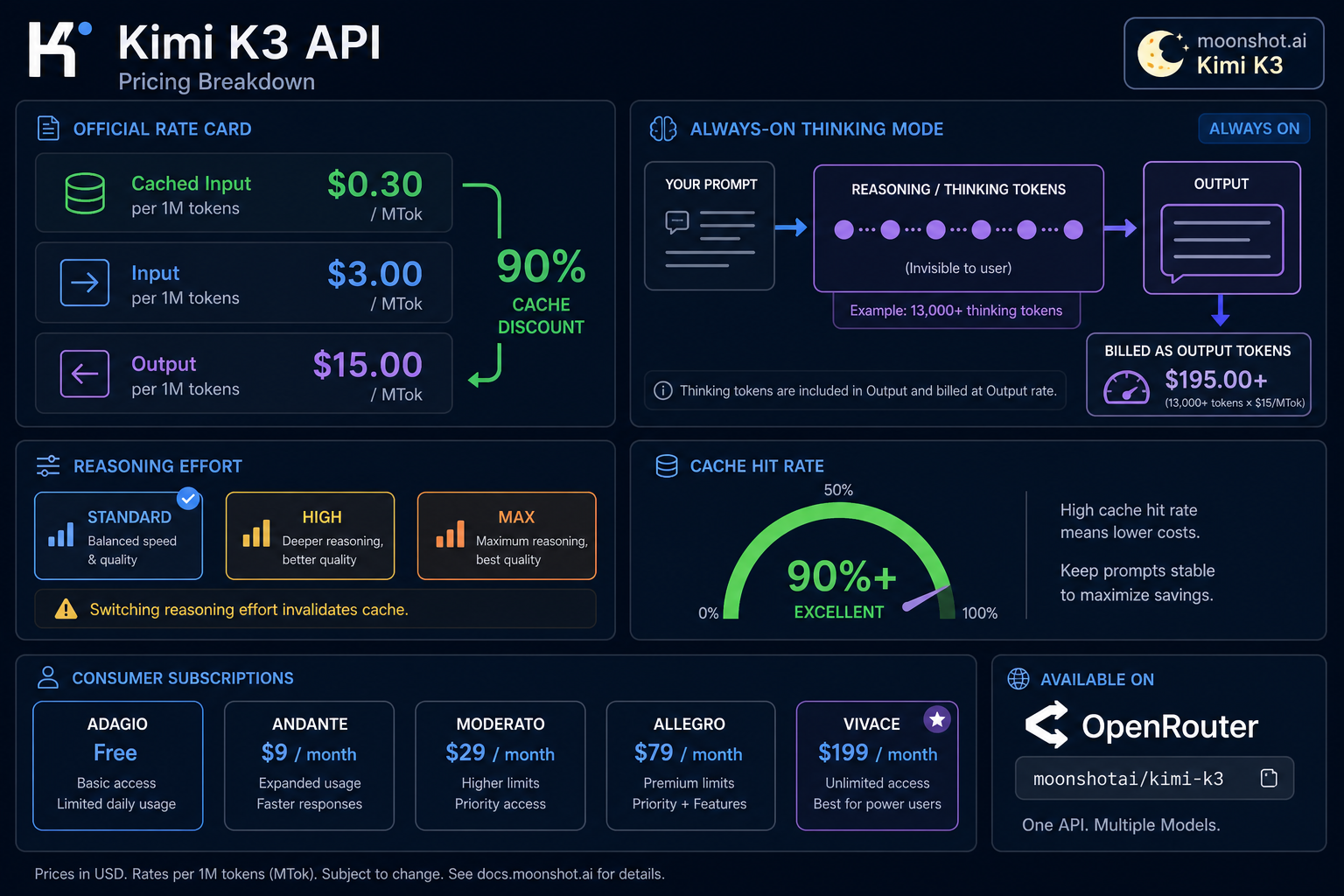
- API 定价: $3 / MTok input,$15 / MTok output,$0.30 / MTok cached input(cache hit 90% 折扣)。
- Base URL:
https://api.moonshot.ai/v1,OpenAI 兼容。Model ID:kimi-k3。 - 获取 key:
platform.kimi.ai或platform.moonshot.ai(同一底层控制台)。 - Thinking mode 无法关闭。 K3 在回答前始终推理,这些 reasoning tokens 按 output tokens 计费——独立测试在 max reasoning effort 下,单次短任务曾记录超过 13,000 thinking tokens。
- Reasoning effort 有三个档位——Standard、High、Max——session 中途切换会 使 context cache 失效,触发昂贵的重新预填充。
- Caching 自动进行。 无需手动 cache ID 或 TTL 配置;Moonshot 报告 coding workload 上超过 90% cache hit rate。
- OpenRouter 也有,模型 ID
moonshotai/kimi-k3,同样 $3/$15 每百万定价。 - 消费者 App 订阅(Adagio/Moderato/Allegretto/Allegro/Vivace,$0–$199/月)与 API 分开计费,不含 API 调用。
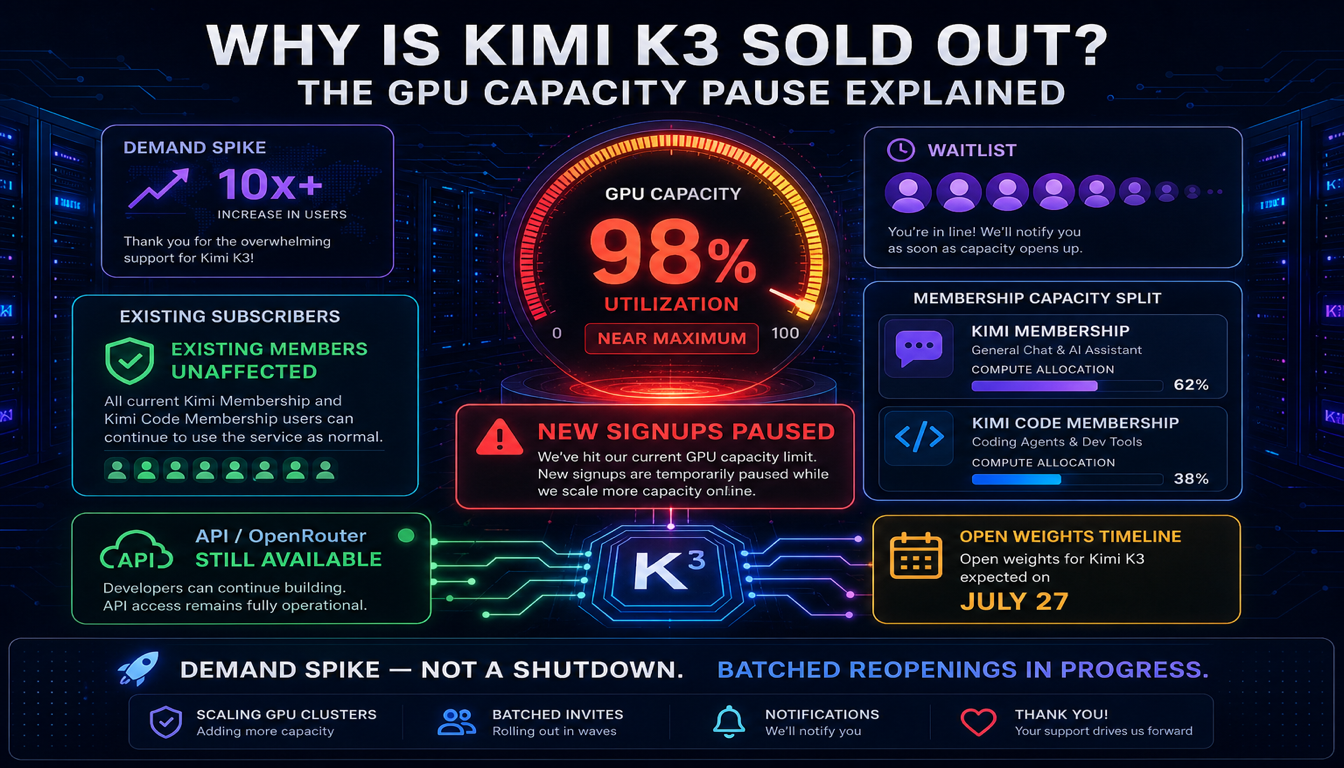
- 新 subscription signup 目前暂停。 Moonshot 于 2026 年 7 月 19 日因 demand 超出 GPU capacity 暂停新 Kimi Membership signup — 现有 subscriber 和(据报道)API 不受影响。详情:为何 Kimi K3 售罄。
如何获取 Kimi K3 API key
- 访问
platform.kimi.ai(或platform.moonshot.ai——两者目前都路由到同一开发者控制台),登录或创建账号。 - 完成任何必需的验证。
- 打开 API keys 部分,创建新 key。立即复制——只显示一次。
- 在跑超过少量测试调用之前,设置 budget cap 和低余额 alert。由于 always-on reasoning tokens,成本可能比标称 per-token 价格涨得更快。
将 key 视为 secret——环境变量或 secret manager,切勿提交到源码。
Kimi K3 官方定价
| Cached input | Input | Output | |
|---|---|---|---|
| Kimi K3 | $0.30 / MTok | $3.00 / MTok | $15.00 / MTok |
cached 与 uncached input 之间有 10 倍 差异,input 与 output 之间有 5 倍 差异。对 K3 来说,两个 multiplier 都比大多数模型更重要,原因见下节。
为什么「always-on thinking」会改变你的账单
大多数模型让你选择是否在可见推理上 spend tokens。Kimi K3 不行——每个响应在最终答案前都包含 reasoning_content,Moonshot 将这些 reasoning tokens 按 output tokens 计费,全价 $15/MTok。
实践中这意味着:
- 短 factual 答案的成本可能远高于看起来应有的水平。 独立测试曾记录,最终答案仅几句的任务消耗超过 13,000 thinking tokens。按 $15/MTok,仅 reasoning 就约 $0.20,还没算可见答案的生成。
- 你无法 opt out。 与 Kimi K2.6 不同——K2.6 可完全关闭 thinking mode 以应对 latency 和 cost-sensitive 调用——K3 没有「instant」模式。如果你的 workload 是高 volume、latency 或 cost-sensitive——autocomplete、简单分类、短 chat 回复——K3 的 per-call floor 比 sticker price 看起来更高。
- 你能控制的是 reasoning effort,而非 reasoning 本身。 K3 暴露
reasoning_effort参数,三个档位——Standard、High、Max——改变模型推理多少,而非是否推理。
Reasoning effort 档位与 cache trap
三个 effort 档位(Standard / High / Max)让你在 cost、latency 和 answer quality 之间 trade off。catch:session 中途切换 reasoning effort 会使 context cache 失效。 如果你已建立 large cached context——长对话、大文档、agent 的 running tool-call history——中途从 Max 切到 High(或反之),整个 cache 被 forfeited,下次调用以 full uncached-input 价格 re-prefill。
实用规则:每个 workload 选一个 reasoning effort 档位,在该 session 或 agent run 的整个生命周期内 stick with it。 除非已确认 cache-invalidation cost 对该 case 值得,否则不要 dynamically 调整 effort。
Kimi K3 上 caching 的实际工作方式
与部分 provider 不同,你无需手动管理 caching——无需创建 cache ID 或设置 TTL。Moonshot 平台(基于 Mooncake disaggregated inference 架构)自动 cache 重复 prefix,并报告 coding workload 上超过 90% 的 cache hit rate。
要在实践中达到该 hit rate:
- 将稳定内容——system prompt、tool 定义、长 reference 文档——放在 prompt 最前面。
- 将每次调用变化的部分——用户最新消息、最新 tool result——放在 最后面。
- 在 session 内保持 reasoning effort 档位 constant(见上)。
- 避免在调用之间 reorder 或 lightly reword system prompt;即使小改动也可能 break prefix match,导致 cache miss。
OpenAI 兼容请求格式
Kimi K3 的 API 匹配 OpenAI Chat Completions 请求/响应 shape,因此任何 OpenAI SDK 只需改 base URL 和 model name 即可工作。
curl
curl https://api.moonshot.ai/v1/chat/completions \
  -H "Authorization: Bearer $MOONSHOT_API_KEY" \
  -H "Content-Type: application/json" \
  -d '{
    "model": "kimi-k3",
    "messages": [
      {"role": "user", "content": "Summarize the tradeoffs of hybrid linear attention in two sentences."}
    ]
  }'
Python(OpenAI SDK)
from openai import OpenAI

client = OpenAI(
    api_key="your-moonshot-api-key",
    base_url="https://api.moonshot.ai/v1",
)

response = client.chat.completions.create(
    model="kimi-k3",
    messages=[
        {"role": "user", "content": "Write a Python function to debounce calls."}
    ],
)
print(response.choices[0].message.content)
设置 reasoning effort
response = client.chat.completions.create(
    model="kimi-k3",
    messages=[...],
    extra_body={"reasoning_effort": "standard"},  # "standard" | "high" | "max"
)
记住:同一 session 内调用之间改变此值会使 cache 失效。
在 OpenRouter 上使用 Kimi K3
K3 也在 OpenRouter 上列为 moonshotai/kimi-k3,与 direct API 相同的 $3/$15 每百万定价。如果你已通过 OpenRouter 路由多个 model provider,想添加 K3 而无需单独 Moonshot 账号,这是合理选项——你需要 funded OpenRouter 账号和 OpenRouter dashboard 的 key。
Kimi K3 免费吗?
三个不同问题,三个不同答案:
使用 Kimi 消费者 App 或 Web chat。 有免费档(Adagio),有 usage limit。那不是 API——不 spend API credits,计费(或不计费)分开。
使用 Kimi K3 API。 生产用途没有 ongoing 免费档。新账号可能有 limited trial access 用于测试,但 sustained usage 需要 funded 付费账号。
通过 OpenRouter 或类似 router 使用 Kimi K3。 完全 separate 计费,有各自的 credit 系统。不是「Kimi API」,尽管 reach 同一模型。
Kimi K3 订阅费用与方案
与 API 分开的产品,覆盖 web App、mobile App、Kimi Code CLI、agent credits、Slides 和其他工具:
| Tier | Price/month | Covers |
|---|---|---|
| Adagio | Free | Web/mobile chat,limited usage |
| Moderato | $19 | 更高 usage cap |
| Allegretto | $39 | 更高 usage cap,更多 agent credits |
| Allegro | $99 | Heavy usage,扩展工具 |
| Vivace | $199 | 最高档,maximum agent credits |
这些档位都不含 API access——如果你在构建产品或集成,无论个人订阅哪一档,都需要 separate 付费 API 账号。
新 subscription signup 自 2026 年 7 月 19 日起暂停。 Moonshot 在 K3 发布 48 小时内 demand 将 GPU capacity 推近极限后,暂时停止接受新 Kimi Membership subscriber。现有 subscriber 保持完整 access,Moonshot 正在分批 reopen 新 signup。Moonshot 还将产品拆分为两个 separate subscription — Kimi Membership(web/app/office use)和 Kimi Code Membership(programming-focused)— 以更精确分配 compute。完整 breakdown:为何 Kimi K3 售罄。若今天需要 access,上述 API 未报道受 pause 影响。
需留意的额外成本
- 每次调用的 reasoning tokens。 上文已述——这是 K3 特有的 single biggest surprise-cost 因素。
- 使 cache 失效的 effort 切换。 Session 中途改
reasoning_effort会 forfeit cache,以 full price re-prefill。 - Agent loops。 Tool-using agent 的每一步通常 re-send system prompt、tool schema 和 running history。每一步还叠加 reasoning tokens,长 agent run 可能 quickly 累积成本——cap max steps 并设置 wall-clock timeout。
- Tool 和 search 费用,若使用 Moonshot 内置工具——查看当前 tools 定价页,这些与 model tokens 分开计费,结果会加回下次请求的 input。
如何控制 Kimi K3 API 成本
- 在 scale 超过测试之前,在控制台设置 hard budget cap 和低余额 alert。
- 每个 workload 选一个 reasoning effort 档位,避免 session 中途切换。
- Cache-first 结构 prompt:稳定内容在前,volatile 内容在后。
- 始终传
max_tokens,尤其在 agent loops 中,否则 reasoning tokens 可能 run long。 - Bound agent loops,用 step counter 和 timeout。
- 分别 log input、output、cached-input 和 reasoning-token 计数,以便看清账单来源——若只 log 可见 output,reasoning tokens 容易 miss。
最终建议
Kimi K3 的 per-token 价格 genuinely 有竞争力,理解 reasoning-effort tradeoff 后 caching 故事也很强。但 always-on thinking mode 意味着「简单」调用的 effective cost 高于 headline 价格暗示,且高于 Kimi K2.6——K2.6 可完全关闭 reasoning。在将 K3 用于高 volume、latency-sensitive workload 之前,跑 real test batch 并 specifically log reasoning-token 消耗——不要 assume sticker price 就是全部故事。
K3 定价与 Claude 的直接对比见 Kimi K3 vs Claude。完整模型概览从 Kimi K3 详解 开始。
FAQ
Kimi K3 多少钱? 每百万 input tokens $3,每百万 output tokens $15,cached input hit 每百万 $0.30——cache hit 约 90% 折扣。
能关闭 Kimi K3 的 thinking mode 省钱吗? 不能。与 Kimi K2.6 不同,Kimi K3 始终在 thinking mode 运行。你只能调整 reasoning effort 档位(Standard、High、Max),无法完全关闭 reasoning。
为什么 Kimi K3 账单比预期高?
最常见原因是 reasoning tokens——K3 每次调用都生成 reasoning_content,按 output tokens 以 $15/MTok 计费。短可见答案前可能有数千 reasoning tokens。分别 log reasoning-token 计数以看真实 breakdown。
切换 reasoning effort 能省钱吗? 可能减少每次调用的 reasoning-token volume,但 session 中途切换 effort 档位会使 context cache 失效,forcing full-price re-prefill。每个 session 选一个档位,而非 dynamically 调整。
Kimi K3 免费使用吗? 消费者 chat App 有免费档(Adagio)。API 没有 ongoing 免费生产档——新账号可能有 limited trial access,但 sustained usage 是付费的。
如何获取 Kimi K3 API key?
在 platform.kimi.ai 或 platform.moonshot.ai 登录,打开 API keys 部分,创建新 key。鉴于 always-on reasoning-token 成本,立即设置 budget cap。
Kimi K3 比 Claude 便宜吗? Per-token 基础上,是的——K3 的 $3/$15 定价低于 Claude Opus 4.8 的 $5/$25。但 Opus 4.8 让你更 granular 地控制 reasoning effort,直接对比取决于实际 token mix。见 完整定价对比。
Kimi K3 subscription 费用是多少? Consumer subscription(与 API billing 分开)从免费(Adagio)到 $199/月(Vivace),中间 $19/$39/$99 档位。自 2026 年 7 月 19 日起,新 subscription signup 因 GPU capacity crunch 暂时暂停 — 见 为何 Kimi K3 售罄 了解当前状态和 workaround。
现在还能获取 Kimi K3 subscription 吗? Paid consumer tier 的新 signup 自 2026 年 7 月 19 日起暂停,现有 subscriber 不受影响,Moonshot 正在分批 reopen spot。Pay-per-token API 未报道受影响,若今天需要 access 是更可靠的路径。
相关指南
相关阅读
继续沿着 Gemma 4 内容集群往下读,选一个离你当前决策最近的下一篇。

Kimi K2.6 API Key 与价格:已补充 K2.7 Code
Kimi K2.6 与 K2.7 Code 的当前 API 价格、cache hit 的含义、速率限制层级如何影响吞吐,以及做预算前应该核对哪些项目。
为何 Kimi K3 售罄?GPU Capacity 暂停详解
Kimi K3 并非 discontinued 或真正「售罄」——Moonshot 在发布 48 小时内 demand 耗尽 GPU capacity 后暂停了新 subscription signup。若你正尝试获取访问,这意味着什么。
Kimi K3 vs Qwen 3.8:已确认与未确认(2026 年 7 月)
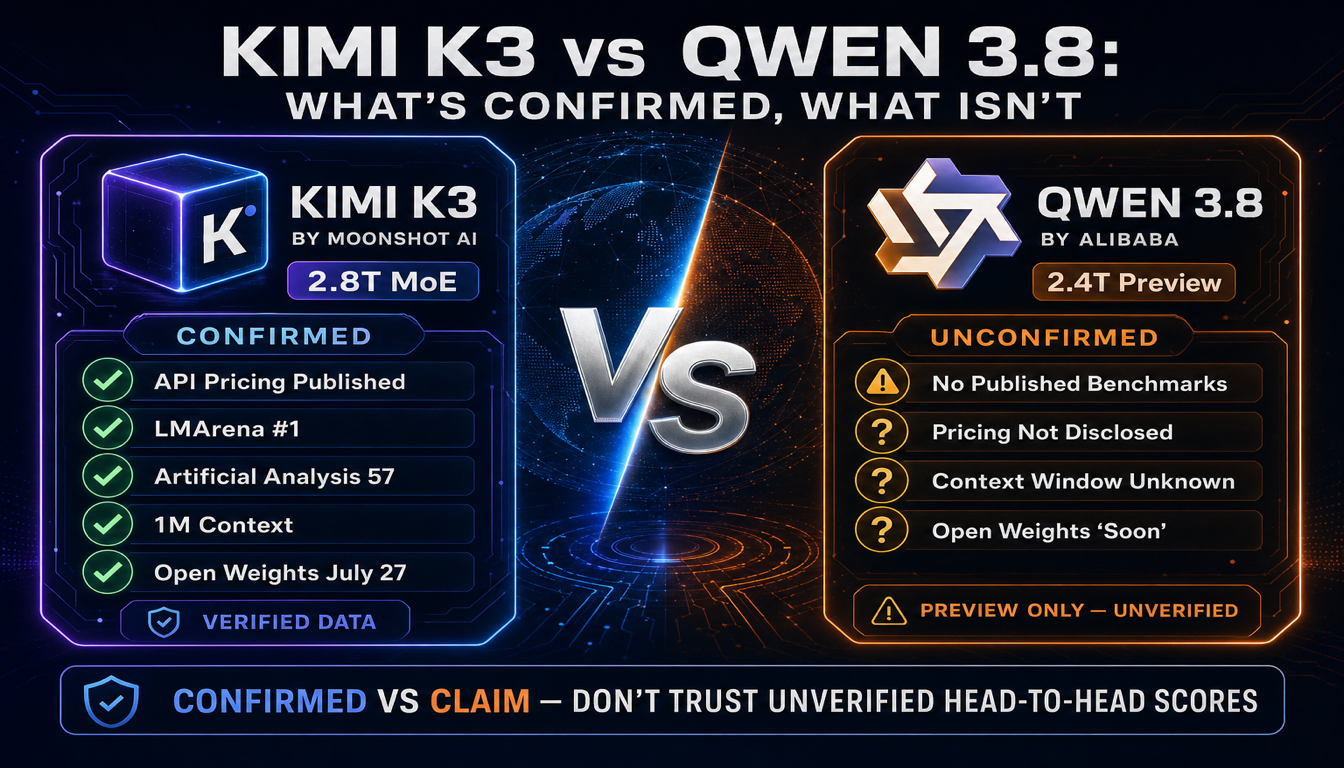
阿里巴巴在 Kimi K3 发布三天后 preview 了 Qwen 3.8,称其为「仅次于 Fable 5」。问题在于:Qwen 3.8 尚未发布任何 benchmark。在做出选择前,以下是双方实际已确认的内容。
还没决定下一篇看什么?
回到指南页,按模型对比、本地部署和硬件规划三个方向继续浏览。